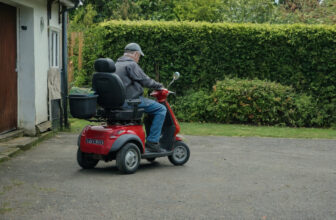
A mobility scooter parts list is shorter than it looks: battery and charger, motor, tiller, throttle, brakes, tires, seat, control panel, and freewheel lever. The four you handle every day are the tiller, throttle, seat, and charger. The one worth learning first is the freewheel lever, because in freewheel mode the motor disconnects and the automatic brake will not hold you.
Bringing home a new mobility scooter is exciting, and it gets a lot less mysterious once you can name the main parts and picture what each one does. Think of this as a friendly tour of your scooter, in plain words, so you can ride with confidence and describe things clearly to family, your supplier, or a technician.
The battery and charger
The battery is the rechargeable power source that runs everything on your scooter: the motor, the lights, and the display. On most models it lives in a compartment under or behind the seat. The charger is the separate cord-and-box that plugs into a wall outlet on one end and into your scooter (or the removed battery pack) on the other. You’ll use it regularly, often overnight, so the battery is topped up and ready when you are.
The motor
The motor is what turns the battery’s stored energy into movement. It’s tucked away near the rear wheels, out of sight, quietly doing the work of driving you forward and in reverse. You won’t touch it day to day, but it helps to know it’s back there. When people talk about how a scooter “pulls” up a gentle slope or cruises along a path, the motor is the part they mean.
The tiller
The tiller is the upright steering column in front of you, a bit like the handlebars on a bike but shaped like a T or a loop. You steer by turning it left or right, and most of your main controls sit right on top of it, within easy reach of your hands. Many tillers can be tilted or folded to make getting on and off easier, which is handy to know as you settle into your seat.
The throttle
The throttle is how you tell the scooter to go. It’s usually a paddle, lever, or thumb control mounted on the tiller: press one side to move forward, the other to reverse. The further you press, the faster you travel, up to the speed you’ve set. When you let go, the throttle springs back to the middle and the scooter begins to slow on its own.
The brakes
Most mobility scooters brake automatically. The moment you release the throttle, the scooter slows and then holds itself still, even on a slope, thanks to an electromagnetic brake that engages when no power is going to the motor. This “let go and stop” behavior is one of the most reassuring things about riding, and it’s why you rarely need a separate brake pedal or lever.
The tires
Your scooter rolls on either three or four tires, depending on the model. Some are solid and never need air; others are air-filled for a softer ride. Either way, they’re the part that grips the ground, smooths out bumps, and keeps you steady over curbs, ramps, and different surfaces. Knowing which type you have is useful when you chat with your supplier.
The seat
The seat is your command post, and it’s built for comfort over time. Most swivel so you can turn to get on and off without twisting awkwardly, and many have armrests that flip up out of the way. Seats often slide forward and back and adjust for height, so it’s worth learning how yours moves to find your most comfortable, well-supported position.
The controls and display
The control panel sits on top of the tiller and is your dashboard. Here you’ll typically find a key or power button, a speed dial to set how fast the scooter can go, a horn, and often lights and turn signals. A display or set of indicator lights shows you the basics at a glance: that the scooter is on, and roughly how much battery charge is left. Taking a minute to find each button while parked makes it all feel natural once you’re moving.
The freewheel lever
The freewheel lever is a small but important switch, usually near the rear wheels. In its normal position, the motor is engaged and the brake works as usual. Flip it to freewheel mode and the motor disconnects so someone can push the scooter by hand, which helps if it ever needs to be moved while switched off. The key thing to remember: keep it in drive mode whenever you’re riding, because in freewheel mode the automatic brake won’t hold you.
Beginner FAQ
Do I need to memorize all these parts right away?
Not at all. The names you’ll use most often are the tiller, the throttle, the seat, and the charger, the pieces you touch every day. The rest are simply good to recognize, so that if a question comes up or you call your supplier, you can describe what you mean without any guesswork.
What’s the difference between the throttle and the controls?
Think of the throttle as the “go” control you hold while riding, and the control panel as the settings you choose before you start, like turning the key, setting your speed, or switching on lights. Your hands rest near both, but the throttle is the one you’re actively working the whole time you move.
Why does my scooter stop by itself when I let go?
That’s the automatic brake doing exactly what it should. When you release the throttle, power to the motor cuts off and the brake gently engages, slowing you and holding you in place. It’s a built-in safety feature, not something going wrong, and it’s why the freewheel lever should stay in drive mode while you ride.